
Amazon Is Rewriting Your Titles Starting July 27. Here's How to Keep Control.

Connor Mulholland
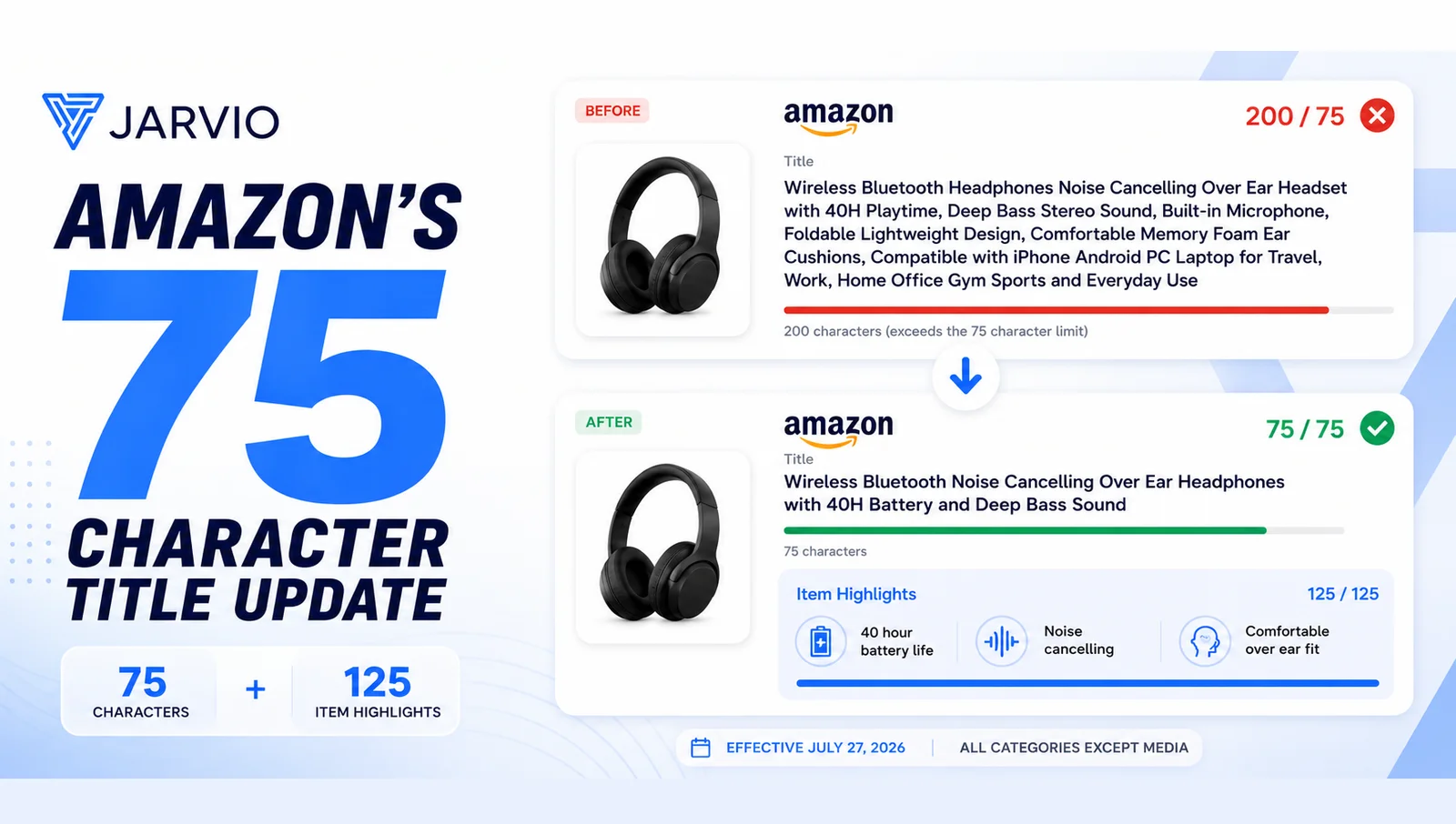
On July 27, 2026, Amazon enforces a 75-character title limit across every category except media and adds a new 125-character searchable Item Highlights field below the title. If your titles are over the limit and you do nothing, Amazon's AI rewrites them for compliance, not for your keyword strategy. Keep rank-carrying keywords in the title, use Item Highlights for net-new coverage, and redistribute the rest into bullets. Do the work now, review every change, and push it live on your timing — not Amazon's. Jarvio has a ready-made skill that runs the whole workflow, 20 ASINs at a time, with every proposal staged for your approval.
On July 27, 2026, Amazon starts enforcing a 75-character title limit across every category except media. If your titles are over the limit and you do nothing, Amazon's AI rewrites them for you, its way, using its own model instead of your keyword judgment.
One thing to be clear about up front: this needs to be done now. On July 27, Amazon starts rewriting non-compliant titles with its own AI, and you don't get to choose which of your listings it touches or when it gets to them. The most exposed listings are your highest-traffic ones — the exact listings you can least afford to hand to a machine. There is no version of this where waiting helps you. The only safe position is to have every title done, reviewed, and under your control before the 27th.
Here's the part that makes that easy: you can do all the work now, while things are calm, and stay in complete control of when it actually goes live. Run your whole catalog, review the new titles, and let them sit staged and ready. Then push them live on your timing, not when Amazon forces your hand. More on exactly how below.
Here's what most coverage also gets wrong: this isn't Amazon shrinking your listing. It's Amazon restructuring it. Alongside the shorter title, they've added a new 125-character Item Highlights field that's searchable and shows up next to your title in search results and on the detail page. Your title gets smaller, but you get a new place to put the detail that no longer fits.
The sellers who understand this restructuring will come out ahead. The ones who panic-cut their keywords, or ignore the change and let Amazon's AI decide, will lose rank. This guide covers what's changing, what the data actually says about keywords, what sellers are running into in the wild, and how to execute the full workflow — whether you do it by hand, run Jarvio's ready-made skill, or build your own.
What's actually changing
| Detail | Before July 27 | After July 27 |
|---|---|---|
| Title limit | Up to 200 characters | 75 characters, including spaces |
| Item Highlights | Didn't exist | New 125-character searchable field |
| Non-compliant titles | Allowed | Auto-rewritten by Amazon's AI |
| New listings | N/A | Already required to comply |
| Brand Registry sellers | N/A | 14-day window to review AI rewrites |
| Non-registered sellers | N/A | Rewrites generally applied without a review window |
A few things worth pulling out of that table:
The 75-character limit is mandatory. Item Highlights is optional. You have to get your titles under 75 characters. You don't have to fill Item Highlights, though leaving it empty means walking away from net-new searchable space. Because the field is optional, Amazon primarily checks it to make sure there's no restricted content in there.
The review window depends on Brand Registry. Brand-registered sellers get 14 days to review, edit, or reject Amazon's AI suggestions in the Review Listing Changes dashboard before anything goes live. Sellers without Brand Registry generally don't get that window, which is widely reported across the seller community even though Amazon's announcement only spells out the brand-owner side.
New listings already have to comply. If you're launching products right now, the 75-character rule already applies to them. The runway is only for existing listings.
The Item Highlights field appears directly below the title in search results and on the product detail page. It's indexed by Amazon's search engine and is the kind of structured content AI shopping assistants (Alexa for Shopping, formerly Rufus) parse to answer comparison questions like "which protein powder is best for beginners." This isn't a cosmetic tweak. It changes how Amazon's search reads your listing.
Why you can't afford to ignore it
Amazon's AI rewrites are built to solve one problem: compliance. They shorten your title to fit the rules and read cleanly. What they don't do is protect the specific search terms driving your conversions, or preserve your brand voice, or know which words are load-bearing for your rank.
That's the real risk, and it's worth being precise about it. The problem isn't "AI." Plenty of this workflow is a great fit for AI, and we'll get to that. The problem is an unsupervised, generic rewrite with no human looking at it before it goes live. Amazon's model doesn't know that "postpartum" is the term carrying your rank, or that dropping "BPA-free" quietly loses you a filter buyers actually use.
Here's the concrete version. If your top-revenue ASIN has a 145-character title and you do nothing, Amazon rewrites it. You find out about the keyword damage two weeks later in your rank data, and by then, clawing that position back costs real money in PPC. Sellers are also finding that Amazon's own AI-generated content sometimes gets flagged by Amazon's own content checker, which tells you the tooling is early and worth reviewing rather than trusting blind.
The sellers who take control now have a genuine advantage over the ones waiting for Amazon to sort it out.
Automate this with Jarvio; no coding required.
Start 14-day free trialThe keyword question everyone's asking: title or Item Highlights?
This is the most debated question in the seller community right now, and the honest answer is that nobody knows the exact weighting Amazon gives Item Highlights, and anyone telling you they do is guessing.
Amazon has confirmed exactly one thing about the field: it's searchable and visible with titles in search results and on product detail pages. That's it. No weighting data. No ranking comparison to bullets or backend terms.
ZonGuru, among the most cited researchers on this, put it plainly: Amazon hasn't said how heavily it weights the field, and some coverage has filled that silence with confident claims (that it carries a specific algorithmic weight, that it now outranks your bullets and backend terms) that Amazon has never published. Treat all of it as guesswork.
The best practice that actually holds up
Given the uncertainty, the consensus across credible sources converges on one rule:
Keep rank-carrying keywords in the title. Use Item Highlights to expand coverage, not to defend position.
The logic is simple:
- Title keywords have a decade of proven indexing weight. That's not changing. If a keyword is actively converting and holding organic rank for you right now, it stays in the title.
- Item Highlights is net-new coverage. Every keyword you add there expands your indexable footprint. You're gaining ground, not trading it. The right question is "what am I not currently indexed for?" and not "which title keywords should I move down here?"
- Don't waste the field echoing your title. Repeating your title keywords in Item Highlights spends new space on coverage you already have. Use it for distinct, additional terms instead.
The golden rule: if you'd be scared to lose the keyword, it stays in the title. If you'd be happy to gain the keyword, it belongs in Item Highlights.
The new three-layer SEO model
The old model was one move: stuff keywords into a 200-character title, write decent bullets, fill backend search terms. That's over. The new structure has three layers, each with a distinct job.
Layer 1: Title (≤75 chars) — Identity
Job: answer "what is this?" in a single mobile glance.
Formula: [Brand] + [Product Type Keyword] + [Primary Differentiator] + [Size/Variant if room]
Only your one or two highest-converting keywords belong here. Everything else gets redistributed. And remember: mobile search results truncate titles at roughly 60 characters, not 75, so your most important differentiator needs to land in the first 60.
Here's the before-and-after in practice:
- Before (200 chars): Wireless Bluetooth Headphones Noise Cancelling Over Ear Headset with 40H Playtime, Deep Bass Stereo Sound, Built-in Microphone, Foldable Lightweight Design, Comfortable Memory Foam Ear Cushions, Compatible with iPhone Android PC Laptop for Travel, Work, Home Office Gym Sports and Everyday Use
- After (75 chars): Wireless Bluetooth Noise Cancelling Over Ear Headphones with 40H Battery
Everything the "after" title dropped (deep bass, built-in mic, memory foam, compatibility, use cases) doesn't disappear. It moves into Item Highlights and bullets.
Title rules:
- 75 characters or fewer, including spaces
- Title Case
- Numerals, not words (2, not "two")
- No ALL CAPS, no emojis, no special characters
- No promotional language (Best, #1, Top Rated, Free Shipping)
- No subjective claims (Premium Quality, Amazing)
- No price, and don't repeat any word more than twice
Layer 2: Item Highlights (≤125 chars) — Comparison
Job: answer "why this one over the competition?" This is the comparison signal, for both shoppers and AI assistants.
This is not a dumping ground for displaced title keywords. Write it as comma-separated, labeled attributes. A useful lens is the six questions a shopper is really asking:
| Question | Example attribute |
|---|---|
| Who is it for? | Sensitive Formula |
| What is it? | 28 Pack |
| What's it made of? | Coconut Oil and Dead Sea Salt |
| What does it do? | Enamel-Safe |
| When/how is it used? | 30-Minute Application |
| How is it different? | Dentist-Recommended |
Example (109/125 chars): Sensitive Formula, Enamel-Safe, Coconut Oil and Dead Sea Salt, 28 Pack, 30-Minute Application, Tooth Whitener
What not to do:
- Sentence format: "Our premium whitening strips are gentle on sensitive teeth and made with natural ingredients." Wastes the field. Neither a shopper nor Amazon's parser can pull clean signals out of prose.
- Keyword salad: "whitening strips sensitive teeth coconut oil enamel safe tooth whitener bleach." Reads as spam and doesn't help anyone compare.
- Labeled attributes (do this): "Sensitive Formula, Enamel-Safe, Coconut Oil and Dead Sea Salt, 28 Pack." Both the search engine and AI assistants parse it instantly.
One trap that's easy to miss: Item Highlights carries the same content rules as your title. Moving a claim Amazon won't allow up top (a health or efficacy claim, say) down into Item Highlights doesn't launder it. If it's not allowed in the title, it's not allowed here.
Layer 3: Bullets — Buyer Questions
Job: answer specific buyer questions and absorb the keywords displaced from your title.
Bullets now carry more SEO weight than before, because they're catching terms that used to live in the title. Write them in Q&A format: an ALL CAPS benefit, a one-line answer, then supporting detail with one or two long-tail keywords. This is also the format AI shopping assistants parse to answer questions like "is it dishwasher safe?" For a deeper walkthrough of writing the whole listing this way, see our guide on writing Amazon listings with AI.
A real gotcha: the field is rolling out unevenly, so test before you trust it
This is the least-discussed and most practically important part of the change, and it's where a lot of early sellers are getting tripped up.
When sellers try to add Item Highlights, many hit this error:
100476: This attribute 'Item Highlight' is currently unsupported. Please refer to the tool tip for additional details.
It's tempting to assume you did something wrong. You probably didn't. This error means the field isn't supported yet for that particular product or category. Amazon's own support has told sellers exactly that, and advised leaving the field blank when it happens. At launch, the field also had no attribute in the SP-API at all. That's since been added, but the rollout is gradual and varies by marketplace and product type, and the field has been buggy early (some sellers report it only saves when left empty).
What this means for you practically:
- Test one ASIN before any bulk job. Confirm the field is actually live for that product type and marketplace before you build a catalog-wide upload around it.
- For variations, both parent and child titles need to be under 75 characters. But don't add the Item Highlights attribute to the parent ASIN. It tends to throw errors and waste time. Put Item Highlights on the child ASINs.
- Use a "partial update" flat file (only the columns you're changing) so you don't accidentally overwrite other attributes. Note that the programmatic flat-file path via the SP-API Feeds endpoint was retired in 2025, so the reliable bulk route now is the manual flat-file upload in Seller Central.
None of this is a reason to wait. It's a reason to work in small, checked batches instead of firing a blind bulk update at your whole catalog.
This is bigger than one policy
It's worth zooming out for a second, because this change makes a lot more sense in context. Amazon has been systematically moving listing content into AI hands. It rolled out agentic AI across the seller platform in late 2025, its AI tools generated more than 12 million listings in 2025, and reported seller acceptance of AI recommendations has run north of 90%.
The title change is one more step in that direction. Which is exactly why the stance that wins here isn't "AI bad" or "AI good." It's: let AI do the heavy lifting, keep a human on the decision. That's not a hedge. On a platform moving this fast, it's the only way to move at Amazon's speed without handing over the one thing you can't get back — control of what your customer actually sees.
That's the principle the rest of this guide is built on.
How to do this in Jarvio
We built a ready-to-use skill that runs the whole workflow: audit, keyword research, title writing, Item Highlights writing, and title proposals, across your full catalog, 20 ASINs at a time. Every proposed change lands on your Products page for review. Nothing goes live without you approving it.
That last part is the whole point. AI does the work. You make the call, and you make it on your timing. Run your entire catalog now, while there's no pressure, and every proposed title sits staged in Jarvio, ready to go. You review, edit what you want, and hit execute when you actually want the change live. So you're never scrambling against a deadline, and you're never waiting to find out what Amazon's AI decided for you. The work is done, and the trigger is yours.
Option 1: Run the skill off the shelf
The skill is called Amazon Title Compliance & Item Highlights Refresh, and it's available to every Jarvio user. Open the chat and say:
"Run the title compliance skill"
Here's what it does:
Phase 0 — Resume: Loads your full catalog from the All Listings Report, sorts by 30-day revenue (highest first), and checks which ASINs already have pending proposals. Run it more than once and it picks up where you left off automatically.
Phase 1 — Audit: Scores every ASIN into three tiers:
- CRITICAL (>100 chars) — most exposed to an AI rewrite
- HIGH (76–100 chars) — non-compliant
- OK (≤75 chars) — compliant title, but Item Highlights may still need writing
Phase 2 — Keyword intelligence: Pulls keyword data from the best source available for each ASIN, in priority order: your Search Term Report (actual conversion data), Search Query Performance from Brand Analytics, third-party ASIN keyword data where connected, and a live listing scrape as a last-resort fallback. The summary shows you which source drove each decision, so you know whether you're looking at real conversion data or volume estimates.
Phase 3 — Strategy: Applies the keyword matrix. Title gets your top one or two by conversion (never demoted). Item Highlights gets the next four to six, each answering a different one of the six questions and each distinct from the title. Everything else routes to bullets.
Phase 4 — Write: Drafts compliant titles (≤75 chars, mobile-optimised, full rules enforced) and Item Highlights (≤125 chars, labeled attributes).
Phase 5 — Propose: Submits each new title to Amazon via the Propose Amazon Change block. Every proposal lands on your Products page and stays there, staged, until you approve it. Nothing goes live until you hit execute, so you control the exact moment each change goes out. Item Highlights are written and saved but not auto-pushed, because the manual flat-file upload is still the safest route for that field while it's rolling out.
Phase 6 — Save: Appends everything to a persistent Title Compliance Results table that builds up across every batch, every ASIN, every new title, every Item Highlights string, every keyword decision, every proposal status, ready to export.
The batch model
The skill runs 20 ASINs per pass, top revenue first. When it finishes a batch, it tells you how many remain and prompts the next run. You review between batches, approve what's good, edit what isn't, then run again. Each pass takes about 5 to 10 minutes of processing, plus your review time. A 500-ASIN catalog gets done in a focused day, not a month, and the resume logic tracks what's already proposed so you don't have to.
Option 2: Build your own version
If you have a specific title formula, brand voice, or keyword strategy, you can spin up your own version of the skill. Just tell Jarvio what to change, for example:
"Create a title compliance skill that puts the differentiator before the brand name, uses my preferred keyword source first, and writes Item Highlights as two benefit statements instead of comma-separated attributes."
Jarvio builds it, saves it, and runs it the same way, batch and resume logic included. You can adjust the title formula, the keyword source priority, the Item Highlights style, the batch size, or add category-specific compliance rules.
Option 3: Full automation with Flows
For large or multi-brand catalogs that want a fully automated run, Jarvio Flows loop through every ASIN independently, run on a schedule or on demand, log every result with pass/fail status, and keep going if one ASIN fails. This is the right approach for agencies and anyone who'd rather review results at the end than watch each batch. If you'd like help setting one up for your catalog, book a demo and we'll build it with you.
Doing it manually? Here's the full workflow
Not a Jarvio user? Here's the process end to end:
- Export your catalog from Seller Central → Inventory → Manage All Inventory. Filter for titles over 75 characters.
- Prioritise by revenue. Your top 20% of ASINs by sales get rewritten first — they're the most exposed.
- Pull your Search Term Report (last 60 days) for each priority ASIN. Identify the top 15 converting keywords.
- Apply the matrix: title gets the top one or two by conversion; Item Highlights gets the next four to six (distinct, answering the six questions); bullets absorb the rest plus long-tail variations.
- Write the new title:
[Brand] + [Product Type] + [Primary Differentiator] + [Size/Variant]. Count characters. Over 75? Shorten. No exceptions. - Write Item Highlights as comma-separated labeled attributes. Count characters. Over 125? Drop the last phrase. Check nothing duplicates the title.
- Update bullets to absorb displaced keywords in Q&A format.
- Sanity-check against Amazon's suggestion: Manage All Inventory → Edit → View Enhancements. Use it as a reference, not the final answer.
- Test one ASIN via flat file first to confirm the Item Highlights field is live for that product type (watch for Error 100476), then bulk upload with a partial-update file.
- Monitor for 14 days: organic rank, sessions, CTR, unit session percentage. If revenue drops 10%+ with no external factor, test a different keyword split.
What to watch after you make the change
Days 1–14: stabilisation window. Title changes reset ranking signals, so expect some volatility. Track organic rank for your top 10 converting keywords, impressions and clicks (Brand Analytics SQP), and unit session percentage (Business Reports → Detail Page Sales & Traffic).
Don't change titles within seven days of a peak event (Prime Day, Black Friday, Cyber Monday). The stabilisation window will eat into your peak traffic.
Days 14–60: AI discovery visibility. Alexa for Shopping and external AI tools (ChatGPT, Perplexity, Google AI Overviews) take four to eight weeks to fully re-index a listing after a title change. Test by asking category-relevant questions in the Amazon app and noting whether your ASIN shows up.
90-day baseline: if unit session percentage and total revenue are flat or up, the new structure is working.
The 6 mistakes that will cost you rank
- Dropping a high-conversion keyword entirely. If a keyword converts at 15%+, it has to live somewhere: title, highlights, bullets, or backend. Losing it completely is an unforced error.
- Treating Item Highlights as title overflow. It's a structured comparison field with its own job. Write it with intention, not leftovers.
- Ignoring mobile truncation at 60 characters. Your title can be a compliant 75 characters and still fail if the differentiator sits in characters 61–75, because mobile shoppers never see it.
- Changing titles during peak traffic. Search needs 7 to 14 days to stabilise. Don't sacrifice Prime Day to a title experiment.
- Letting Amazon's AI rewrite without reviewing. Amazon's AI is competent at compliance. It is not built to protect your keyword strategy or your brand voice.
- Waiting to start. This isn't optional, and your highest-traffic listings are the most exposed. Wait, and Amazon writes your titles before you do, on its schedule instead of yours.
Start now, not after July 27
The sellers who act before the rollout reaches them keep control. The ones who wait get Amazon's interpretation of their product, optimised for compliance, not for conversions.
If you're on Jarvio, open the chat and run the title compliance skill today. If you're not, start with Jarvio and it's ready to go: keyword research, title writing, Item Highlights, and proposals, all in one workflow, with you approving every change.
Managing a large or multi-brand catalog? Book a demo and we'll set up the automated Flow with you.
Sources: Amazon Seller Central official announcement (June 10, 2026) and Product Title Requirements help page; Amazon Seller Forums; ZonGuru; Canopy Management; PPC Land; Clear Ads. Weighting of the Item Highlights field is not confirmed by Amazon; strategy guidance here reflects cross-source consensus, not published ranking data.
Frequently asked questions
When does Amazon's 75-character title limit take effect?
What is the new Item Highlights field?
Should I put my main keywords in the title or in Item Highlights?
What happens if I don't update my titles before July 27?
Does mobile really truncate titles at 60 characters?
What is Error 100476 when I try to add Item Highlights?

Connor Mulholland
Ready to automate your Amazon operations?
Start 14-day free trialRelated articles
How to Use AI to Write Amazon Listings (and Why Copy-Paste Fails)
AI can write great Amazon listings, but pasting ChatGPT output straight into Seller Central is a mistake. Here's the right approach.
StrategyHow to Add Backend Keywords on Amazon
Backend keywords are invisible to shoppers but critical for ranking. Here's how to fill them correctly.
StrategyBest Practices for Amazon Brand Analytics in 2026
Master Amazon Brand Analytics. Learn how to use search query data, competitor insights, and demographics to grow your brand.